O Ordna 0.2.0 CLI · Web · Core MIT
A Kanban that lives inside your repo.

Ordna is a local-first, git-based task board you run from your terminal or your browser. No servers, no logins, no SaaS — just markdown files, plain commits, and an API your agents can drive.

$ npx @frehilm/ordna-cli ordna See what it does
~/MyProjects/TestCode · ordna
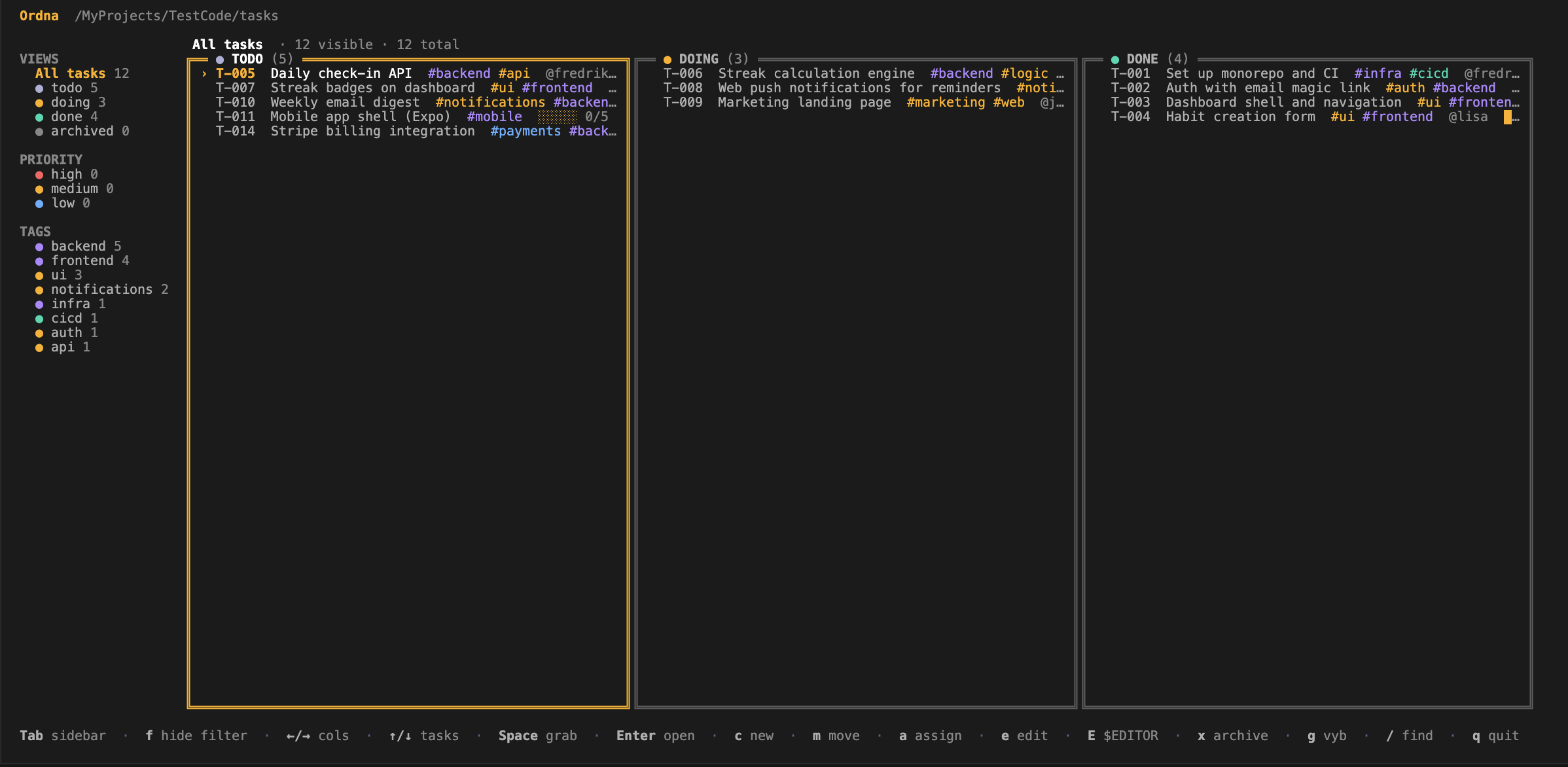
Ordna TUI — keyboard-driven Kanban in the terminal with sidebar of views, priorities and tags, three columns of tasks.
ordna board · 12 tasks · 3 columns
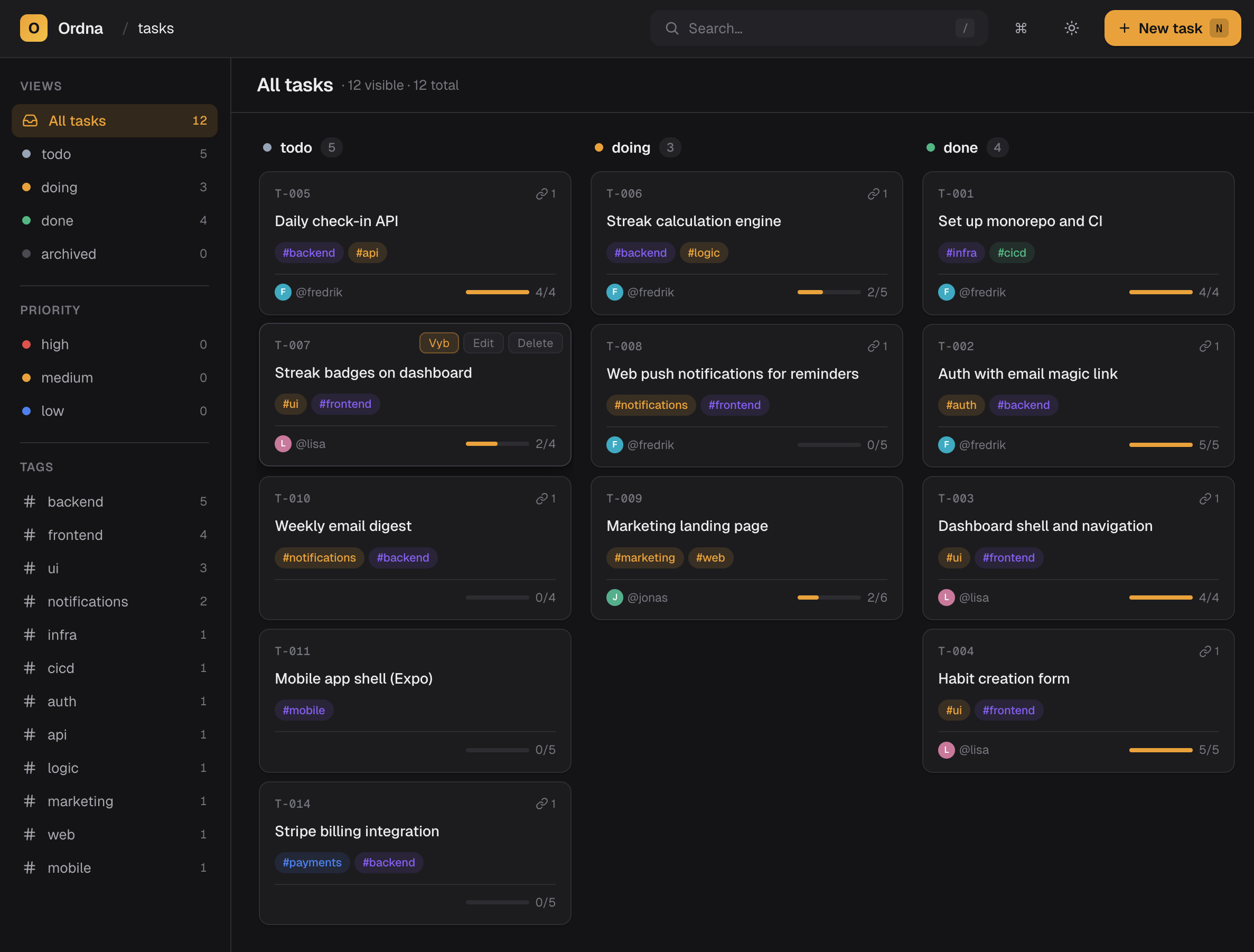
Ordna Web — same board in the browser with cards, tags, assignees, progress and contextual edit actions.
localhost:7421 · same .ordna/ files
Built for the way you actually work
markdown tasks works offline branches as boards TUI & Web your data, your repo agent-ready API
Why Ordna

A small tool with strong opinions.

Every feature traces back to one idea: your tasks should live next to the code they describe — versioned, reviewable, and editable by anyone (or anything) that can edit a file.

Git-native, by design

Every task is a markdown file. Every move is a commit. Use the merge tools you already have to resolve conflicts, blame to find who changed what, and branches to plan what-ifs.

diff --git a/.ordna/doing/T-006.md b/.ordna/done/T-006.md
- status: doing
+ status: done
+ closed_at: 2026-04-28T14:02Z
renamed: .ordna/doing/T-006.md.ordna/done/T-006.md

Local-first, no account required

Boards live in .ordna/ in your repo. There is no Ordna server. There is nothing to sign up for. It works on a plane, and it works in 2032.

.ordna/
├─ todo/     5 tasks
├─ doing/    3 tasks
├─ done/     4 tasks
├─ archived/ 0 tasks
└─ board.json  columns & settings

Two interfaces, one source

A keyboard-driven TUI for the terminal and a polished web UI for the browser. Both read and write the exact same files.

Your data, your laws

Plain markdown + JSON, committed alongside your code. Migrate, grep, script, or quit any time — there is nothing to export.

Built for keyboard speed

Every action — move, assign, create, filter, archive — is one or two keystrokes. Touch your mouse only when you want to.

Tags, priorities & views

Filter by #frontend, by @assignee, by priority, or by saved views. Combine and refine without leaving the keyboard.

Branch-aware boards

Different work on different branches stays on different branches. Merging brings the work with it — no duplicate tickets.

Embeddable core

Drop @frehilm/ordna-core into any Node project. Use it for dashboards, CI checks, scripts, or your own UI.

Install

Up and running in one command.

Pick your interface — terminal, browser, or both. They share the same on-disk format, so you can mix and match per project.

$ shell — @frehilm/ordna-cli
# Install globally — one binary, no daemons
$ npm install -g @frehilm/ordna-cli

# Or run without installing
$ npx @frehilm/ordna-cli ordna

# Open the keyboard-driven board in your repo
$ ordna

# Common commands
$ ordna add "Refund flow — partial amounts"
$ ordna move T-007 doing
$ ordna list --status review
$ ordna assign T-007 @fredrik

Three packages on npm

All MIT-licensed, all written in TypeScript, all share @frehilm/ordna-core under the hood.

@frehilm/ordna-cli
TUI & commands · the daily driver
npm ↗
@frehilm/ordna-web
Browser UI · zero-config local server
npm ↗
@frehilm/ordna-core
Library · read & write boards programmatically
npm ↗
Storage · new in 0.2

Three places tasks can live.

By default, tasks are plain markdown files in tasks/ — the mode this page has been describing. Two opt-in alternatives change where tasks are stored: one keeps the file ergonomics but adds safe IDs across offline writers, the other moves tasks into git refs so your working tree stays untouched.

file Default

file

Tasks are plain markdown files in tasks/. Files are the API.

  • cat, grep, agents — anything that reads a file reads a task
  • Task edits show up in pull requests like any other diff
  • Per-task history via git log tasks/T-001.md
  • No git required — works in any folder
  • Offline ID collisions resolved manually on merge
Pick when
Solo or small team. Agents involved. You want PR-reviewable task changes.
hybrid

hybrid

Files in tasks/ plus a synced ID allocator in refs/ordna/state.

  • Same file ergonomics as file mode
  • Safe IDs across offline writers — no more T-042 collisions
  • Tasks still show in PRs and git blame
  • Requires a git repo
  • schema: backlog not supported
Pick when
Multi-machine collaboration is real and ID collisions have bitten you.
namespace

namespace

Tasks live as git blobs at refs/ordna/tasks/<id>. The working tree stays clean.

  • Working tree untouched — no tasks/ folder in the repo
  • Auto-sync — every write pushes, auto-fetch every 60s
  • Auto-renumber on push collision, cascading depends_on
  • Agents and file tools can't see tasks — everything via ordna
  • No PR review of task changes, no per-task git blame
Pick when
Repo ships as a published library and you don't want tasks/ in the package.

Auto-detected on first run.

Existing refs/ordna/tasks/*namespace. Existing refs/ordna/statehybrid. Existing tasks/*.mdfile. Otherwise Ordna prompts you (or silently picks file outside a git repo). Override per-project in .ordna/config.yaml, or per-process with ORDNA_STORAGE=file|hybrid|namespace.

Library · @frehilm/ordna-core

Use Ordna as a building block.

Everything the CLI and Web UI do, they do through the same public API. Embed it in dashboards, CI jobs, agent loops, or your own custom client.

A boring, durable API.

Promise-based, fully typed, no global state, no required runtime dependency apart from git. Open a board, list it, mutate it, save it. That's the whole shape.

01
openBoard(cwd) Locates .ordna/, validates schema, returns a typed board handle.
02
board.tasks() & board.columns() Stream the current state, filter by status, label, assignee, or branch.
03
board.add / move / update / archive Mutations write atomically to disk — every change is a clean diff.
04
board.commit(message) Stage and commit pending board changes through the user's existing git config.
05
board.watch(handler) Subscribe to filesystem events — perfect for live dashboards and agent feedback loops.
examples/standup-report.ts
import { openBoard } from "@frehilm/ordna-core";

// Read the board next to your code
const board = await openBoard(process.cwd());

// What did we ship since yesterday?
const shipped = await board.tasks({
  status: "done",
  closedAfter: subDays(new Date(), 1),
});

for (const task of shipped) {
  console.log(`✓ ${task.id} ${task.title}`);
}

// Mutations are just function calls
await board.add({
  title: "Schedule retro",
  status: "todo",
  tags: ["chore"],
});

await board.commit("chore: prep retro card");

Agents that pull their own work.

Because every task is a file and every state change is a commit, an agent can plan, claim, and finish work end-to-end — and you review it as a normal pull request.

See the agent recipe
agent loop● ready
1board.tasks({ status: "todo", tag: "agent" }) → pick T-011
2board.move("T-011", "doing") // claim
3// run tools, edit code, run tests
4board.comment("T-011", "draft PR opened")
5board.move("T-011", "done") // hand back
6board.commit("feat(mobile): expo shell")
Agent skill

One file. Any agent. Ordna-ready.

Drop this URL into your agent's context — it documents the commands, file layout, and conventions Claude, Cursor, or your own loop needs to plan, claim, and ship work on the board.

https://raw.githubusercontent.com/FreHilm/ordna/main/packages/cli/templates/AGENTS.md
Git, the way you know it

Reviewable boards, not magic dashboards.

Every plan, move, and decision shows up in git log. Pair work, blame, bisect — all of it just works.

commit a4f1e2c · ⎇ feat/streaks · chore(ordna): T-006 → done @fredrik · 2m ago
before — .ordna/doing/T-006.md
1---
2id: T-006
3title: Streak calculation engine
4-status: doing
5assignee: @fredrik
6tags: [backend, logic]
7-progress: 2/5
8---
9Compute streaks per user across timezones,
10handling DST and freeze tokens.
after — .ordna/done/T-006.md
1---
2id: T-006
3title: Streak calculation engine
4+status: done
5assignee: @fredrik
6tags: [backend, logic]
7+progress: 5/5
8+closed_at: 2026-04-28T14:02Z
9---
10Compute streaks per user across timezones,

Stop herding tabs. Commit your plan.

Ordna is small enough to learn in a coffee break, and stays out of your way for the next ten years.